

Hi there,
This is the first issue of The Takeoff: a short note from us when something new in Fenceline is worth your time.
We rebuilt fenceline.ai, and Fenceline with it, around a bigger idea: everything within your fenceline. One place where every product and service for the home is priced from real suppliers and built by accountable pros. We start with fence, because it sits at the edge of every property.
For contractors, that starts today. Your website, estimates, contracts, payments, calendar and follow-ups now live in one workspace, connected to the job.
If you already run jobs in Fenceline, thank you. This issue is for you too: further down, Already on Fenceline? Start here covers three things to try in your own account this week.
The film below walks through it in a minute. Everything in Fenceline comes from the work you do every day, so if something is missing or gets in your way, tell us at support@fenceline.ai.
What's in the new Fenceline
-
Your website
A website for your business, with an instant estimate homeowners can run on their own.
-
Price the work
Line up the lot survey on the property, draw the fence runs and gates once, then describe the job and watch materials, labor and margin build into a price.
-
Move it forward
Customers sign the contract on their phone and pay the deposit by card, bank or Apple Pay. The payment is recorded on the project, and the job is booked and assigned on your crew calendar.
-
See what needs you
My Work reads each job and shows you the next action. Team Insights shows where the week is stuck and who needs help. Follow-ups come drafted, ready for you to read and approve.
-
Stay in control
Nothing the AI drafts is sent without your approval, and the wallet shows every AI action and what it cost.
New in Fenceline
Quote a fence before your material library is set up
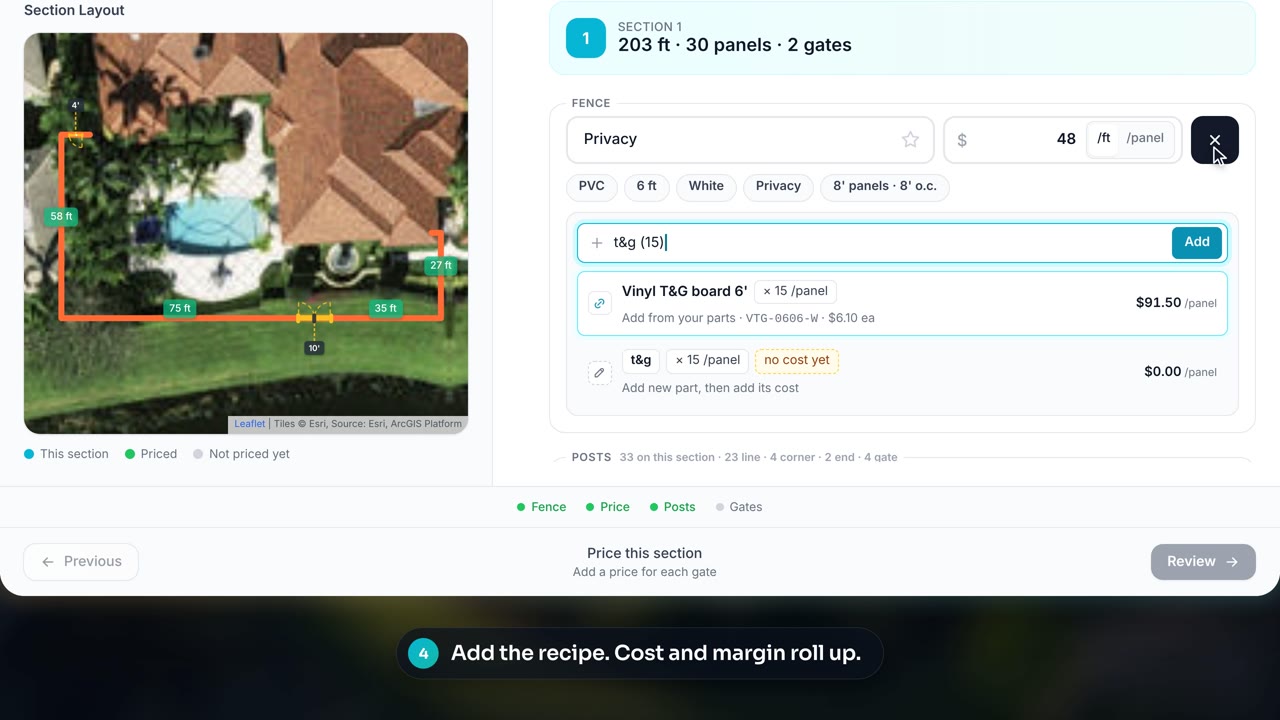
After you draw the fence, the quote card asks what you're building. Describe the fence, posts and gates in plain words, price each one, and give the homeowner a real number on the first visit.
Add parts when you want a full bill of materials. They roll up into one clean line on the customer's quote and never show to them. Save it as a style, and your next quote starts from it.
- 01 Turn it on in Settings, Estimate Settings, Quote without a saved style. Choose Everyone or Admins only.
- 02 Draw the fence on the satellite view in the estimator on the web.
- 03 Describe and price the fence, posts and gates, then save it as a style.
Already on Fenceline? Start here
Open My Work first thing. It reads each of your jobs and shows the next action, so you know where the day starts before the crew rolls out.
Turn on Quote without a saved style. If some of your fence types aren't in your material library yet, switch it on in Settings, Estimate Settings, and price the next one from plain words.
Check your wallet. It shows every AI action and what it cost. Nothing the AI drafts goes to a customer until you approve it.
Open Fenceline and try one of these on your next job.
The core software is free
Fenceline's core software costs nothing for fence contractors. Optional services, payment processing and metered AI cost extra, and you see every AI charge in your wallet.
For suppliers: in the conversation from the start
Your products enter the conversation while the homeowner is still choosing. Your catalog, current pricing and product story are there in the contractor's website and quote.
When the job moves forward, the selected SKUs and quantities carry into order review. To connect your catalog, email support@fenceline.ai.
Start with an estimate
Draw a sample fence on satellite, choose materials and see the estimate a homeowner gets on a Fenceline contractor's website.
Try an estimateTalk soon,
Alex Barrett
Co-founder and CEO, Fenceline